Is there free wireless printing anywhere in the Medical College?
ITS is pleased to release PrinterLogic, a new cloud printing solution that allows WCM users to print from any tagged printer on campus. Available for managed Windows and Mac devices, PrinterLogic securely connects faculty and staff to network printers in your location to print your documents. Please visit the ITS PrinterLogic webpage for more information.
Can I print from my wireless laptop in the Samuel J. Wood Library?
How do I connect to the Internet with my personal laptop?
Weill Cornell Medicine's wireless network service provides laptop and mobile users with fast and secure access to email and web-based services. It is available in most campus buildings, listed as "WCMC". In order to access the WCMC Secure Network, users will first need to have their laptops “tagged” by ITS. If you are an employee and need to tag your laptop or tablet, your Department Administrator will need to submit a “computer connection request” here which should include a fund number. You will also need to make an appointment with ITS here.
Students enrolled in WCM degree programs can access most Library resources using the Apollo network. Certain resources managed by Cornell University Library may not be accessible on Apollo. The instructions on self-registering devices to the free Apollo network are available on the ITS website. Device registration into the Apollo network expires after one year and must be renewed annually.
Students enrolled in WCM degree programs who are on-campus and need to tag their personal devices (up to 5 devices) must submit a “Student Connection Request” through myHelpdesk. Tagging a personal device is not required or recommended. However, those who require access to the secure “WCMC” wireless network, WCM resources such as fileshare or specific research related servers will need to tag their personal device. Make a SMARTDesk appointment prior to going to the SMARTDesk.
ITS has implemented eduroam, a new wireless service for visitors of the Weill Cornell campus. Users who have eduroam at their home institution can access wireless internet at Weill Cornell with their own credentials. WCM users can access wireless at any institution that participates in eduroam. Click here for instructions on how to connect to eduroam.
A guest network is also available to visitors on campus who do not have access to eduroam wireless.
How can I request a meeting or computer room at Weill Cornell Medical College?
How do I log in and make an interlibrary loan request for the first time?
- Find the Interlibrary Loan Tripsaver Request Form here. Click on the button that corresponds with the institution with which you are affiliated (Weill Cornell Medicine or New York-Presbyterian)
- Log in as a first-time User. Your login email is the same email address that serves as your campus wide identification number (CWID). Example: jnj2012@med.cornell.edu or XYZ2023@nyp.org .
- When signing in as a first-time user, your initial password will be the same password you use to log in to institutional programs, such as Microsoft Outlook, email, etc. This field is case-sensitive. After having entered your password, click the "Login" button. This will take you to the "Change Personal Information" screen.
- Provide the requested information. Fields marked with an asterisk *must* be filled in. When you're done, click the "Submit Information" button.
- You may change your personal information at any time by scrolling to "Tools" at the bottom of the sidebar and clicking on the “Update Account Information” button.
If you are having problems logging, possible solutions may include:
- Re-entering your email. See Step 2 above.
- Re-entering your password, making certain that you are using the correct case (and that CAPS LOCK is not on).
- If you still cannot log in, please speak to our colleagues in the Interlibrary Services Department at (646) 962-2560.
- Password-related issues can be resolved by our colleagues at the Circulation/SMARTDesk. While a personal visit is recommended, they are also available by phone: (212) 746-GURU.
How will I know when an interlibrary loan request is ready for me to pick up?
When the requested item arrives, patrons are notified via phone or email, as indicated on the request form.
What if I have an urgent interlibrary loan request?
Requests involving clinical emergencies or immediate patient care can often be filled within hours. Call the Interlibrary Loan Office: (646) 962-2560, for more information.
How long do I have to wait for an interlibrary loan request to be filled?
Plan ahead when requesting materials. The time taken for a request to be filled depends on several factors that are mostly under the control of the library from which we are requesting. Requests for articles are filled electronically, usually within 1-2 business days. Requests for monographs can require a longer time period, depending upon the availablilty of the item and method of delivery. Feel free to check with Interlibrary Services: (646) 962-2560, between the hours of 8 a.m. and 7 p.m., Monday-Friday, regarding the status of a request that you have submitted.
Where do I place an interlibrary loan request?
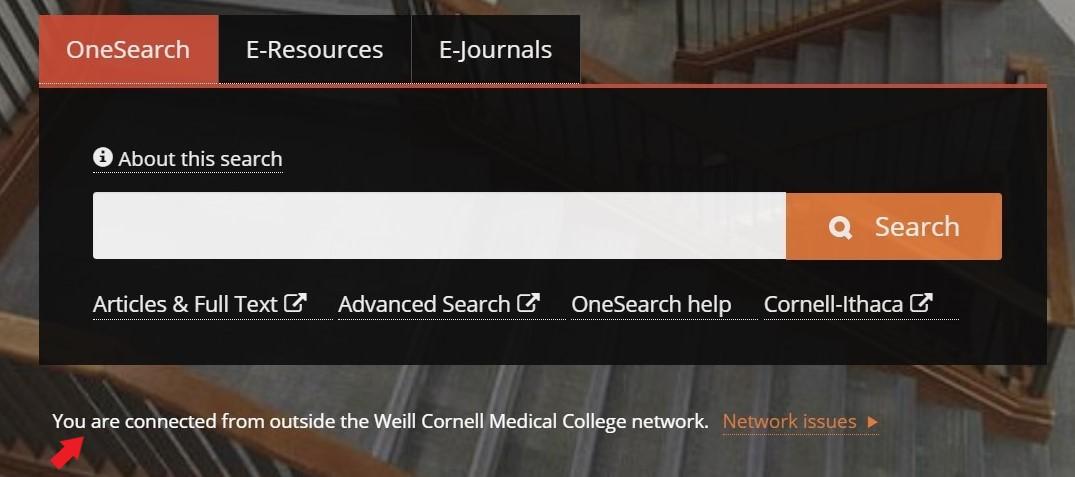
When accessing the Library's website from outside the Weill Cornell network, users will see the message "You are connected from outside the Weill Cornell Medical College network" below the search panel on the library's homepage. Authorized users will need to authenticate using EZproxy to access library resouces.